Overview of the REV Control System
Understanding how your robot thinks and communicates is fundamental to everything you'll do in FTC. The REV Control System forms the electronic backbone of every robot, so it's essential to get comfortable with how it works, especially if you’re just starting out.
The Two-Device Architecture
Every FTC robot operates on a simple two-device setup. Think of it like having a conversation between two people who each have specific roles to play.
The Robot Controller lives on your robot itself. It features an Android operating system and a software package designed for both basic and advanced use cases. This is where all the decision-making happens. A REV Control Hub has the same functionality of an Expansion Hub, but with a built-in Robot Controller (An Android board is connected to it).
The Driver Station stays with your human drivers. It's essentially your remote control, allowing you to send commands wirelessly to the Robot Controller. Most teams use a REV Driver Hub, though certain Android phones can also serve this purpose.
The Lynx Board
Before diving into the REV Hubs themselves, it's worth understanding what's actually happening inside them. At the heart of every Control Hub and Expansion Hub is something called the Lynx Board, though you'll rarely see this name mentioned outside of technical documentation.
The Lynx Board (or Module) is the actual circuit board that handles all the hardware communication. When your program tells a motor to spin or reads a sensor value, it's talking to the Lynx Board through the FTC SDK.
Every time you see references to "Lynx" in error messages or documentation, it's referring to the board inside of your hubs.
The Lynx Module essentially acts as a translator between your high-level Java code and the actual signals that control motors, servos, or sensors. It's doing a lot of work behind the scenes to make sure your commands actually results in the right outcome.
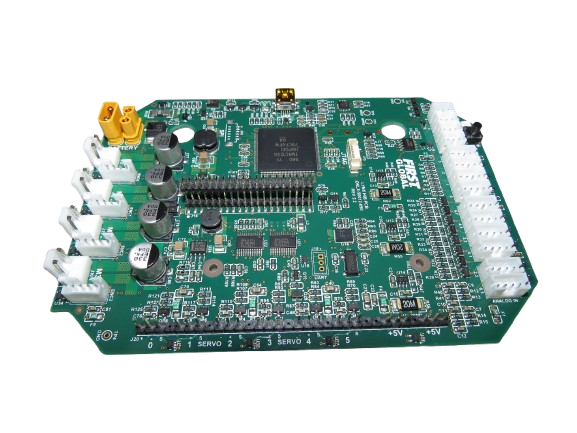
While it's fascinating to understand what's inside these hubs, don't try to take one apart unless you absolutely know what you're doing. The internal components are delicate, and opening up the case will void your warranty.
The REV Hubs
The Control Hub is the all-in-one solution that most teams use. It combines the Android Robot Controller with the Lynx Board mentioned above.
The Expansion Hub is, at its core, just a Lynx Board. In order to use an Expansion Hub as if it were a Control Hub, you need to connect an Android device via the USB Mini port.
Both hubs connect to a 12V battery that powers everything on your robot.